
TDF Viewers
Three separate tools are available to view and record local Tagged Data Format (TDF) packets:
- TDF Localhost
- TDF List
- TDF CSV
TDF localhost
The localhost tool records the latest values of TDF packets from each devices and displays them in a table form through a local web browser. The table view is built on top of Tabulator, providing rich filtering capabilities.
infuse localhost
After running the web server, the interractive web page can be opened in a web browser like below:
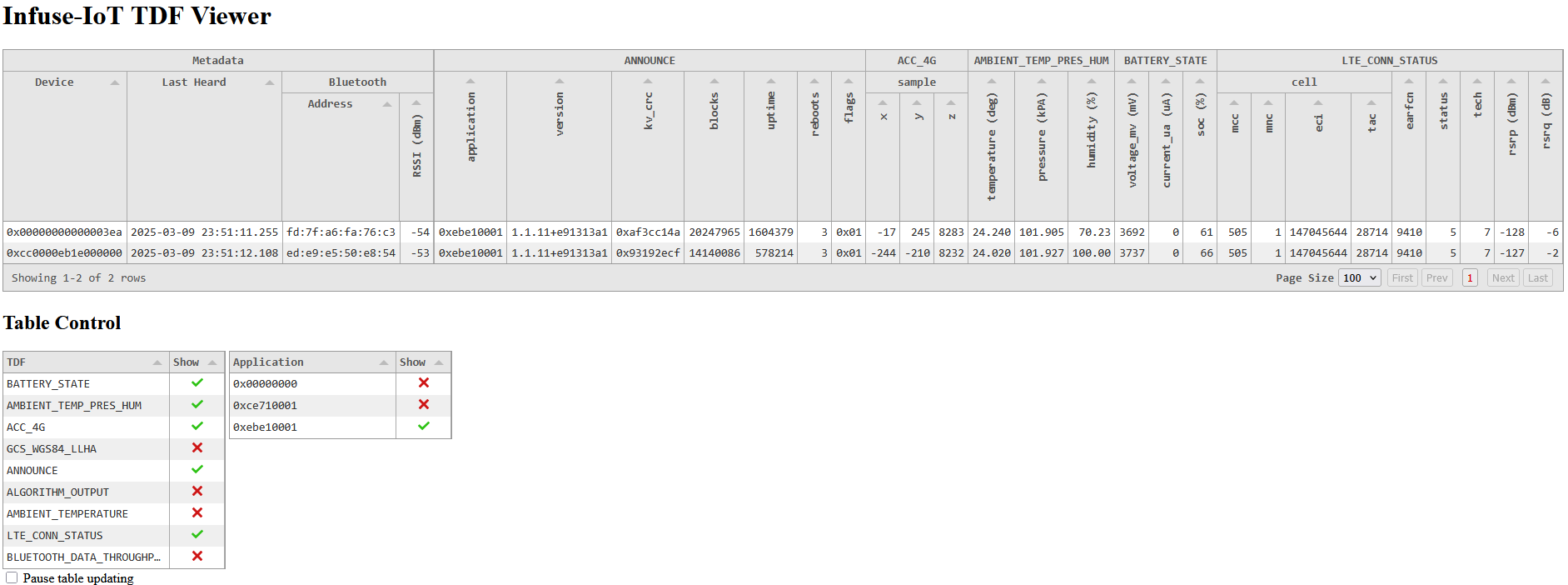
By default all observed devices are displayed which at times can be overwhelming. Filtering options can be shown using the button in the top left corner. Visible devices can be filtered based on if they've send a specific TDFs, their network IDs or application IDs.
The table can also be frozen using the "Pause Updating" checkbox to prevent the table shifting and moving around. This is useful because frequent refreshes will typically reset text selection which disrupts copying selections.
TDF List
The TDF list tool simply prints received TDFs to the terminal with formatting.
infuse tdf_list
It will print out TDFs one-by-one as they're received.
Infuse ID: 00000000000003ea
Interface: BT_ADV
  Address: fd:7f:a6:fa:76:c3 (random)
     RSSI: -56 dBm
-----------------------  -------------------------  -----------------  --------------  -----
2025-03-09 23:55:57.680  ANNOUNCE                   application        0xebe10001
                                                    version.major      1
                                                    version.minor      1
                                                    version.revision   11
                                                    version.build_num  0xe91313a1
                                                    kv_crc             0xaf3cc14a
                                                    blocks             20248669
                                                    uptime             1604665
                                                    reboots            3
                                                    flags              0x01
2025-03-09 23:55:57.680  ACC_4G                     sample.x           -16
                                                    sample.y           242
                                                    sample.z           8283
2025-03-09 23:55:57.680  LTE_CONN_STATUS            cell.mcc           505
                                                    cell.mnc           1
                                                    cell.eci           147045644
                                                    cell.tac           28714
                                                    earfcn             9410
                                                    status             5
                                                    tech               7
                                                    rsrp               -127            dBm
                                                    rsrq               -5              dB
2025-03-09 23:55:57.680  BLUETOOTH_DATA_THROUGHPUT  address.type       0
                                                    address.val        0x60fcf10031da
                                                    throughput         323             B/sec
...
There are also a number of available options:
> infuse tdf_list -h

usage: infuse tdf_list [-h] [--array-all] [--id ID] [--min-rssi MIN_RSSI] [--server-port SERVER_SOCK]

Display received TDFs in a list

options:
  -h, --help            show this help message and exit
  --array-all           Display all array values, not just the last
  --id ID               Limit displayed TDFs by device ID
  --min-rssi MIN_RSSI   Minimum RSSI to display TDF
  --server-port SERVER_SOCK
                        Alternate port to use for Gateway connections (default 8751)
TDF CSV
The TDF CSV tool records all received TDF packets to CSV files.
infuse tdf_csv
Each unique Infuse ID and TDF pair results in a dedicated file,
e.g a BATTERY_STATE TDF received from 0x123456789ABCDEF is saved to 123456789ABCDEF_BATTERY_STATE.csv.
If a file already exists, new data is appended to it.
Example CSV content for BATTERY_STATE TDFs
time,voltage_mv,current_ua,soc
2025-03-10T00:00:35.671640,3737,0,66
2025-03-10T00:00:37.428005,3737,0,66
2025-03-10T00:00:38.531742,3737,0,66
2025-03-10T00:00:40.439066,3737,0,66